17 Minutes Only!

Showing posts with label Google. Show all posts

Wednesday, 2 November 2016

Google’s 3rd Most Important Ranking Factor & Why You Should Care

brain
Back in November 2015, and during UAE Innovation Week, I presented about the future of search. One of the areas I covered was Google’s “RankBrain“.
Google has confirmed that RankBrain is one of the top three ranking factors for search engine results placement. The first and second most important, not in order, are content and links. The third most important ranking factor, RankBrain is one that poses significant challenges to designers, content creators, and marketers who are trying to design content specifically for ranking purposes. RankBrain, an artificial intelligence system that learns user search behavior and evaluates website content, is – according to a March 2016 Q&A with a Senior Strategist at Google – the third most important ranking factor out of the hundreds they use to rank and place search results.
In October 2015, Bloomberg reported on RankBrain and included some key information about the AI factor as provided by one of Google’s senior research scientists. This information included the statement that RankBrain was the third most important ranking factor in search results, so the March 2016 statement is simply a confirmation of what we’d already been told by a senior Google staffer. RankBrain is still in third place officially, but the position is “hotly contested” as it jockeys for better placement against content and links in the top three ranking factors.

Why care?

Why does RankBrain challenge designers who are focusing on SERP placement? Because it isn’t a static algorithm component that you can easily define and design around or for. It learns and evolves with every one of the billions of user queries and thousands of indexed web pages it encounters each day. RankBrain also doesn’t replace the many different elements of Google’s algorithm, it is just one small cog in the massive algorithm machine that Google officially named Hummingbird in mid-2013. Now, after you’ve optimized your online content for as many verified ranking factors as you can find, you have to contend with a factor that may be just as unpredictable as user search behavior.
Before you start fretting about your SEO strategies, you should know that RankBrain does not handle all search queries performed on Google, which sees millions of queries every second. Most of the searches that RankBrain processes are those that have never been entered into a search query box before. While you might think that there isn’t much Google hasn’t seen yet, keep in mind that it receives three billion search queries every single day. Approximately 15% of those queries – or 450 million – are searches never before entered by any human being.
The ability to analyze and interpret as-yet-unknown and ambiguous searches is a huge step forward in the search industry because, completely new queries aside, searchers are asking questions or looking for information with more conversational words and phrases than ever before, too. Voice searches on mobile devices have opened the doors for this practice to a large degree, and users are taking advantage of the convenience of speaking their query rather than typing it.
While you might think this has little to do with your marketing strategies, RankBrain does have an impact on your SEO. It means you will have to start doing what you should have been doing all along – designing your content for users, not search engines. Some of the ways you can do this include:
  • Using more conversational search phrases as your keywords.
  • Including long-tail keywords in your content to make it more relevant to user searches.
  • Applying user experience design (UXD) tips to your websites, pages, and content.
The March 2016 Q&A that confirmed the top three ranking factors also provided a bit more insight into how Google’s algorithm works. The Senior Strategist for Google said that, in essence, different parts of the algorithm have more or less weight depending on the search queries entered and the search results provided. One set of results may show that a dozen specific algorithm factors dominate the determination of SERP placement, while another set of results doesn’t take any of those same factors into account when assigning rank position. This adds one more dynamic factor to the way designers, marketers, and content creators have to shift their focus toward an optimal user experience rather than an experience created for an algorithm.

Closing thoughts…

If you have been tailoring your online content to meet the wants, needs, and demands of your audience all along, you likely have little to worry about when it comes to RankBrain or any other Google algorithm component. Keep your focus on creating the most valuable and engaging experience for your users and they will repay you with continued traffic, leads, and a return on your investment that a search engine can never provide.
This post was originally published on Sandstorm Digital FZE

Thursday, 4 August 2016

Product Feed Optimization for Google Shopping

Google-Shopping-Hero-16-9
Most commonly, advertisers starting off with a paid search platform such as AdWords reach their respective audience through keyword targeting. However, with Google Shopping (or product listing ads), e-commerce businesses utilize a product feed as the main targeting tool.
The feed contains information about your products such as price, availability, brand, etc. The better the product feed, the more likely your products will reach a relevant audience with the right search. And the more often your ads reach shoppers looking for your product, the greater your chance of improving not only engagement but conversion rate.
Optimizing your product feed to meet Google’s requirements is step one. But getting the green light in Google Merchant Center does not equate to perfect targeting. There are additional steps you can (and should) take to ensure your product feed accurately represents your products.

First, the basics

Developing your first feed can either be very simple or a big pain. Most common e-commerceplatforms can simply export product feeds that automatically meet Google specifications. This is the best option for most businesses as it makes things easier over time when products change (price, colors, etc.).
Depending on your CMS and product catalog size, it might make sense to manually create a spreadsheet product feed. This is only a viable option for small businesses.
Depending on what you sell, different attributes are required for your feed. Refer to this table for a detailed summary of required attributes for item categories.
As an example, for a non-apparel item such as a phone charger, the following attributes are required in your product feed:
  • ID
  • MPN
  • Title
  • Product description
  • Product type
  • Google product category
  • Product link
  • Image link
  • Condition
  • Availability
  • Price
  • GTIN (if applicable)
  • Brand
If a product has multiple colors, materials, or sizes there are extra attributes required.

How to optimize

The purpose of this post isn’t to help you just meet specifications, though. Google has tons of help articles to help you do that so if you are having trouble, check those out. Also, you can always call the AdWords help number and get help from a rep.
If you are looking to strengthen your product feed targeting, grow reach, and lower cost, there are certain attributes to focus on.
  • Product title
  • Description
  • Product type
Those three attributes are your friends. Google allows you a lot of flexibility with these attributes and it uses them when determining when to show your ads.
Be descriptive! This doesn’t mean keyword stuffing, but it does mean using the language your customers will be searching with. Let’s look at product type as an example.
Product type is similar to Google product category but with fewer restrictions. Your Google product category must match up with Google’s product taxonomy. Say you’re an online sporting goods store. One of your products might be baseball catcher’s gloves. Using Google’s taxonomy, that product is defined as such:
Sporting Goods > Athletics > Baseball and Softball > Baseball and Softball Gloves and Mitts
Google Feed Taxonomy Example
But since ‘product type’ isn’t limited by the taxonomy, you can take that a step further and improve that to:
Sporting Goods > Athletics > Baseball > Baseball Gloves > Catchers glove > Leather Catcher’s Glove > Wilson Leather Catcher’s Glove
You can put in whatever you want to help explain to Google what your products actually are. This will increase the chance of your product showing up when, for instance, someone searches for Wilson catcher’s gloves, and reduce the impressions for more general searches like ‘baseball glove’ because in those cases they’re very likely not looking for that specific product.
This is just one example, but the lesson is to be descriptive. This is your targeting. Don’t assume Google will understand your product with one word when you can use more to tell a better story. Edit any and all attributes you can to tell a better story.

Other recommendations:

Besides building your feed to be stronger, there are a few other things to pay attention to that will help performance:
  • Keep your feed up to date with all product info, availability, and price. Inconsistencies will hurt conversion rates and could result in suspensions from Google.
  • In AdWords, make sure your Shopping campaign is well structured with organized product groupings so you can strategically bid on product groups.
  • Make sure to review your search query reports often to analyze relevancy of traffic and add negative keywords when necessary to improve targeting.
Optimizing Google Shopping campaigns can be a little counter-intuitive if you are more used to traditional search advertising. But that doesn’t mean you don’t have tools to improve performance. You just need to take the time and work with your CMS or manual feed. If you have additional questions about where to start, let us know!

Wednesday, 22 June 2016

5 Effective Ways to Use the Google AdWords Keyword Planner

5-ways-to-use-keyword-planner
The Google AdWords Keyword Planner is a free tool provided as an aid to help build out your Search Network keyword lists.
Here are five ways you can use the Google AdWords Keyword Planner and have a healthy account:

1. Get keyword ideas

Are you struggling to build a keyword list that is relevant to your business, products, and/or services? The Keyword Planner has a couple of solutions to help you find what people are searching for when looking for your products or services.
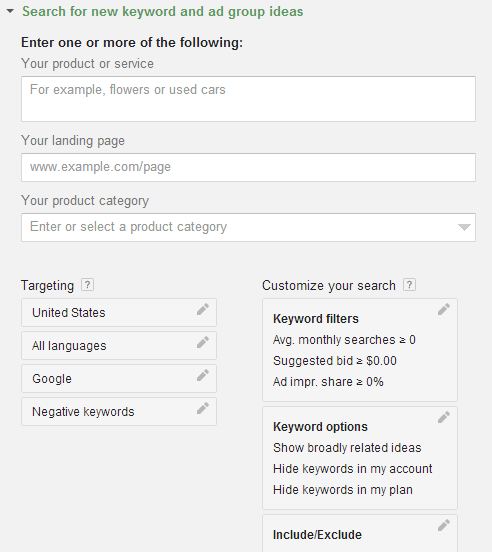
In the Planner you can click on “Search for new keywords and ad group ideas” in order to simply tell Google what your product or service is, or by providing a URL for a page on your site that is highly relevant to your business, or selecting your product from a large list of predetermined categories.
The Planner also has an option to refine suggested keywords by adding targeting for specific locations, languages, search networks and even adding negative keywords.
Keyword planner example
Fill out the information and let Google suggest new ideas that you hadn’t thought of.

2. Discover search volumes

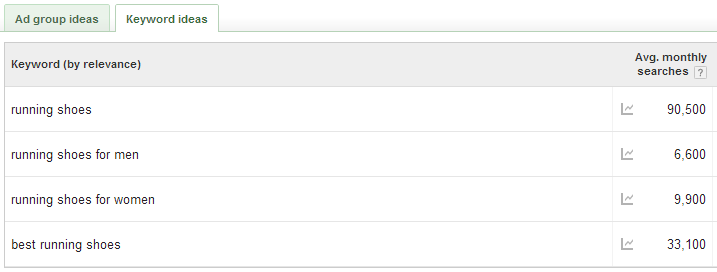
The Keyword Planner can also help you find potential impression volume for a list of keywords you already have. To learn how much volume your keywords will have, use the “Get search volume for a list of keywords” feature.
Insert your keyword list and the tool can provide a search volume average breakdown for each keyword.
Keyword ideas

3. Learn how competitive your keywords are

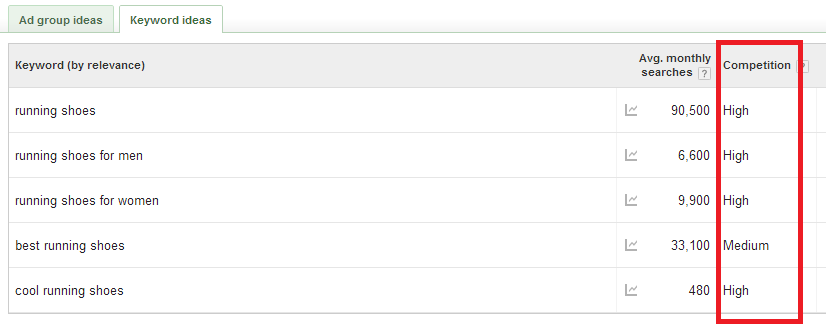
Competition for ad rank can inflate your ad costs substantially. To get a better feel for what your competitors are bidding on, upload your keywords and Google will give you a ranking for each. The ranking will be either low, medium, or high, based on how many other people are bidding on a particular keyword. This can help you decide what types of keywords are high priorities for your competition as well as give you an idea about potential cost.
Keyword competition example

4. Get traffic estimates on a given bid

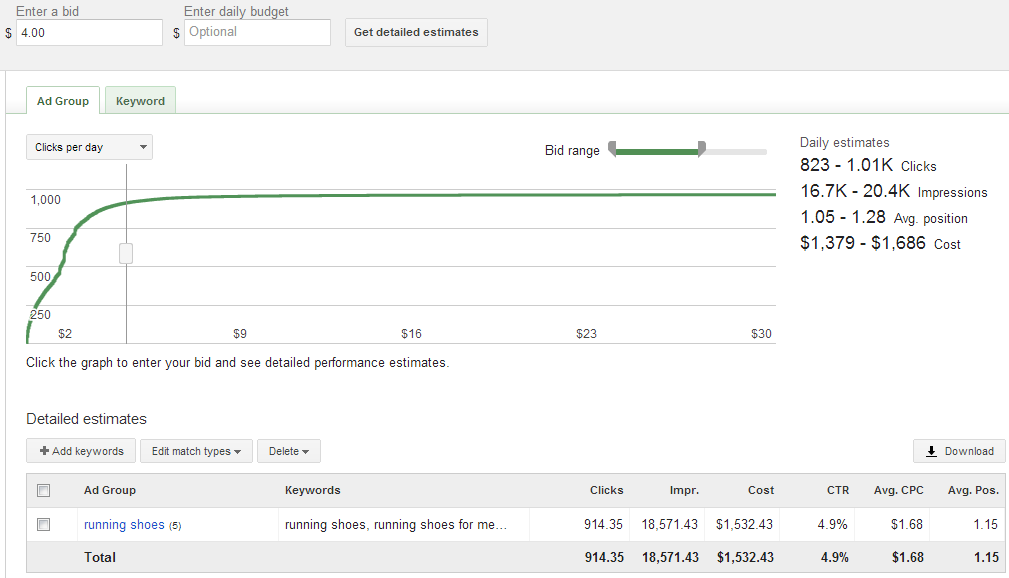
Want to know how much traffic your keywords could generate depending on your keyword bid? Use the “Get traffic estimates for a list of keywords” feature. Provide a list of keywords to the tool and it will produce a nice graph and table that show you what to expect based on your desired max CPC bid.
Get traffic estimates
In the “Enter a bid” field you can put in a potential bid and the tool will show you daily estimates for clicks, impressions, and ad spend. This is particularly useful when launching new campaigns and trying to decide where to start your bidding.

5. Build new keyword lists by merging other lists together

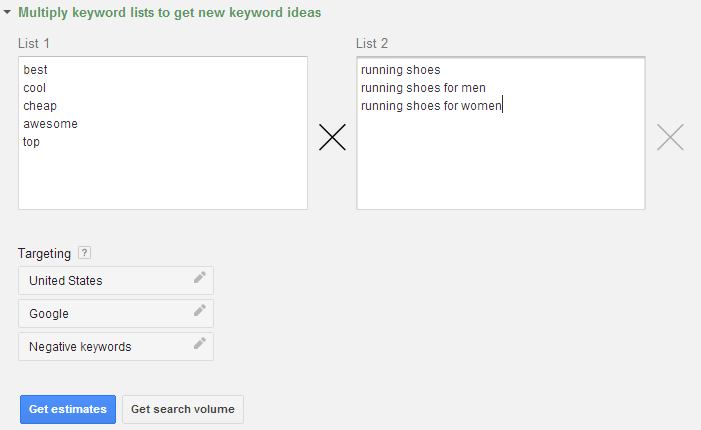
If you are looking to expand your existing keyword list there is an easy way to find new keyword combinations. In the Keyword Planner, you can insert different keyword lists and it will merge them together to make new combinations.
Build new keyword lists by multiplying other lists together
The Keyword Planner has many great features that can help you think outside the box and strengthen your keyword lists. There are other third-party keyword research tools out there you can try too. Perhaps the best feature about the Google AdWords Keyword Planner is that it is completely free. It’s hard to beat that.

Thursday, 9 June 2016

Using Google Trends To Find Low Competition Niches You Never Knew Existed

I came upon this technique by accident while using Trends for something totally different.
Below is the step by step instruction for using Google Trends to find products in a certain market that are newly popular but with significant volume, making them ripe for promotion as an affiliate.
Here goes…

STEP 1: DO A GOOGLE TRENDS SEARCH FOR THE NAME OF A TYPE OF PRODUCT

So at Google Trends, search not the brand name, but the product type. In this example I used “Stroller”, but it could have been “fridge”, “turntable” or anything else.
trends1

STEP 2: CHANGE THE DATE RANGE TO PAST 12 MONTHS

I’ve tested this using different time frames, and this is the one that best ensures you’re going to see real “break out” products, not ones that have only had a bump in the last couple of months due to seasonality or something else.
trends2

STEP 3: SELECT UNITED STATES (UNLESS YOU’RE MAINLY PROMOTING PRODUCTS FROM ELSEWHERE)

Self explanatory…
trends3

STEP 4: SCROLL DOWN TO THE “RELATED SEARCHES” TAB

It’s at the bottom of the page.
And on it, lies a magical little tab called “Rising”.
It will tell you related searches that have had a significant increase in search volume during the selected period.
… And sometimes, those searches are product names.
trends4

STEP 5: LOOK FOR PRODUCT NAMES

Some products you do this with will show no product names/brand name searches.
Others will show legitimate product names. With volume. That you can sell as an affiliate.
trends5
Here I found one that sat at the top of the list… as though it had grown it’s search volume more than 2,650% in the last 12 months.
That is interesting.
From here, it’s only a matter of running your typical analysis of the products, and starting some keyword research.
And the first thing I do is search volume

STEP 6: CONFIRM SEARCH VOLUME GROWTH

You can just use the Adwords Keyword Tool for this.
I like to use the “Show Only Searches Containing My Keyword” option, and I like to drag the date back a little bit to confirm how old the search volume really is. In other words, how “newly popular” this product is, and how low my competition is likely to be.
In this case, the results were very exciting…
trends6
6 months ago this product had almost no search volume. 6 months ago there were likely close to no affiliates promoting it.
The last 3 months it has had a huge amount of attention.
It means there hasn’t been much time for other affiliates to latch on and build campaigns around this product.
It means the chances of it being lower in competition are good.
All that’s left to do from here is confirm that it has an affiliate program, and start creating content.
DISCLAIMER: I didn’t confirm whether this product had an affiliate program because for the sake of demonstrating the technique, it doesn’t matter. There were a lot of brand name strollers that I found about with the same screenshot above, and more than a few of them are perfectly able to be sold as an affiliate.

BOTTOM LINE

I just found a product with
a) Significant search volume.
b) Upward trending search volume in the past year
c) Very likely very low competition
d) That I would have had no idea about otherwise
If you don’t realize why this is so cool, you should read my blog more :)
I hope you get a chance to try this technique for yourself, because the gems to uncover are many.

Monday, 16 May 2016

Google tries its hand at social again with launch of group chat app, Spaces


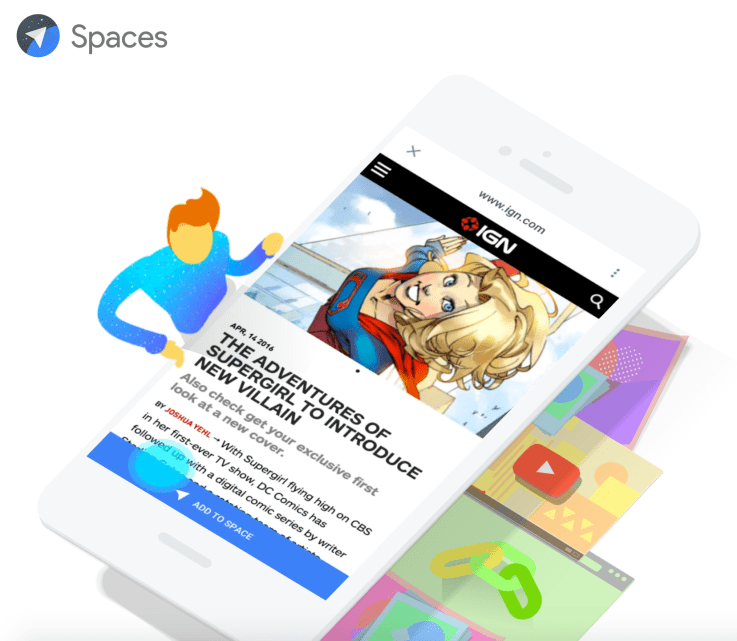
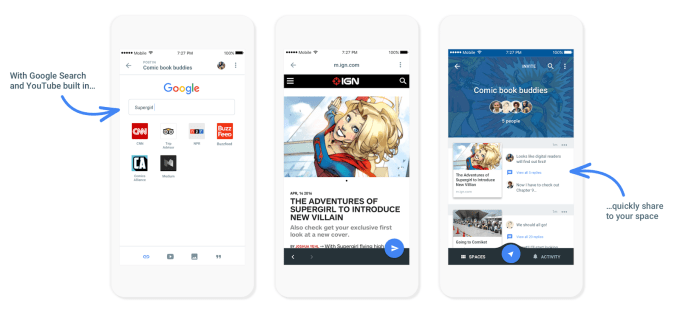
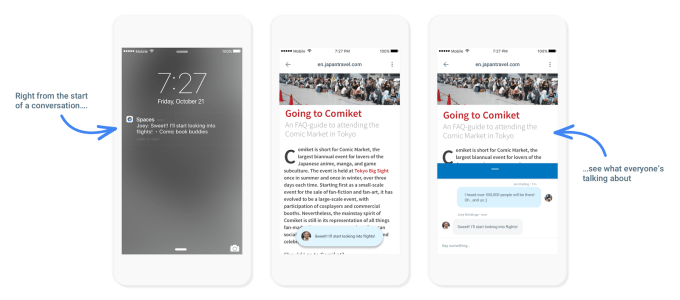
Google is not giving up on its social ambitions, it seems, despite its failures with Google+. The company announced this morning a new social app called Spaces, which focuses on group sharing. The app allows small groups of users to tap into other Google services, including Google Search, YouTube and Chrome, in order to post links and share content without having to move in between apps. They can also have conversations around that content in a group chat-like interface.
This makes Spaces more of a competitor to something like Facebook’s Messenger or WhatsApp, perhaps, because of its focus on chatting and its mobile-friendly nature. (The app is available on iOS, Android and mobile web, though it will also work on the desktop).
What many of the top chat apps today lack are deeper integrations with web services – while posted links may offer rich media previews in some cases, Google Spaces’ users can not only find and share web content from Google Search and YouTube, that content can also be viewed by others without having to leave the app.
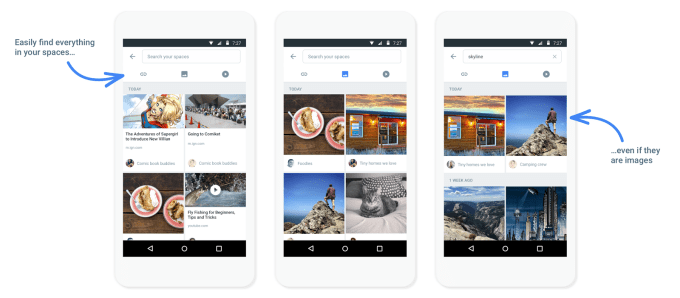
Another decidedly Google advantage is that the content shared in a dedicated space becomes searchable. Users can search their Spaces by keyword, which returns both links and images – the latter thanks to Google’s image recognition technology already live today in other products, like Google Photos.
00_Posting
The interface to the app is fairly simple, too. It’s just one tap to create a new space, for example. Then you can invite anyone else to join via messaging, email or another social network. Once inside a Space, there’s a box at the bottom of the screen where you can tap buttons to post links and images and other content to your chat room. A conversational view lets you see what the group is talking about easily.
02_retrieval_search
The company suggests the app could be used for a variety of purposes, like study groups or trip planning on fans of a particular subject like comic books or tiny homes. This makes Spaces sound a lot like Google+’s own “Communities” feature – in fact, it’s sort of odd to see so much overlap between the two products.
Google, however, is kicking off the launch of Spaces by rolling out a space for each session at its Google I/O developer conference this week. That will allow anyone attending sessions to chat with each other and other Googlers, it says. The company promises other surprises in store as well, for those who download the app.
01_content_viewer
This is not Google’s only attempt at trying something different in terms of a mobile and social experience, however. In addition to Google+, the company last year also launched an app for arranging hangouts called “Who’s Down,” for instance. And it’s been adding more social features to Google Photos, as well.
Google Spaces’ website says the app will be available “shortly,” but it has yet to hit the app stores as of the time of writing.

Thursday, 28 January 2016

What Does Google’s Trial of 4 Ad Positions Tell Us About the Future of Search?

No doubt you’ll have heard by now that Google is trialling 4 top ad positions on some searches in the United States, and the trial looks to be in full swing.
A quick search in AdWord’s preview tool returned one of what I’ve affectionately called “the 4 tops”. (Not one of these – they’re much more fun.)
4 ppc ad slots

Why are Google doing this?

The cynical view would simply be that it’s a test to see if more ads equal more revenue. More ad positions would result in more ad clicks and therefore more revenue for Google. The cynics among us might even guess the move is in response to the Adblockalypse – the rise of ad blocking software which is undoubtedly affecting Google’s display network revenues.
But the non-cynical view is that most of the changes rolled out by Google have the user’s best interests at heart. And if I’m really honest, there are some searches where the sponsored results return better, more relevant options. Speaking from experience, any time I search with the intent to purchase or transact, I find the sponsored results much more useful. As long as Google continues to use the 4 tops when it makes sense, I, for one, will be happy.

Thinking about the future of search

I think there is one obvious takeaway, and one that’s a bit more philosophical.
The obvious takeaway is, if you’re not investing in paid search, you should. Now.
Increasing the number of ad positions above the organic results means your customers are going to have to scroll a long way down the page, past some very enticing adverts, before finding your organic result.
Granted, not all searches will return the 4 tops, and in some instances organic results are preferable. But increasingly the searches that have purchase or transactional intent return a results set heavily weighted toward sponsored results.
This segues nicely into my more philosophical takeaway…
The time has come for marketers to stop thinking about organic and paid search as different entities. Instead, we should think about what’s best for our users in terms of what kind of result makes sense for them in this context.
Let’s face it, neither organic nor paid are free. Both have a cost per click. Both require us to understand the language (keywords) of our users, creating engaging landing pages and optimising campaigns for a desired result. Both have their place in any user-centric digital marketing strategy.
Yes, tactically you need to do different things and use different skills but, at a strategic level, search should just be search.
“What do my users want to do when they enter a query into a search engine?” is the question every marketer should be asking when creating their search strategy. The answer that comes back will define how and when to use paid versus organic.
For example, if your business has a fast-moving, price-sensitive inventory, you might decide paid search gives your users the best results because your ads can react to the changes in your inventory in near real-time. If your business has a much longer sales process, where the user conducts a lot of self-paced research before purchasing, you might decide organic search will provide the best results.

What do you think?

Are you managing search with a strategy that combines organic and paid? Or do you have a separate strategy for each type of search? Please share your thoughts.

Sunday, 6 December 2015

5 Essential Steps to Becoming a Premium Google Adsense Publisher

If you’re reading this, chances are you haven’t been invited to Google’s most exclusive club. Don’t cry–you’re not alone. We all know that a standard AdSense account, when measured, tested, and adjusted can bring in some killer revenue. So what’s the deal with the mythical Premium AdSense Publisher? What is it? How do I get my golden ticket for some serious AdSense shwag?

The tricky part about becoming a Premium AdSense Publisher is that Google hasn’t officially released any guidelines, benefits, or policies about it. It’s the Area 51 of the Google ecosystem. But don’t worry—this invite-only program exists (trust me). It’s just not available to the majority of AdSense account holders.
The Premium account’s exclusivity is implicitly tied to its general purpose, which is three-fold:
  1. Reward high-quality, high CTR content providers that drive steady traffic from various sources.
  2. Increase ad revenue for Google by loosening rules for publishers and getting more clicks for advertisers (win-win).
  3. Create a community of AdSense early-adopters who can help Google test out beta products before fully rolling-them out to the general population.
Google recognizes that high quality websites have advertisers knocking on their doors directly. If these publishers only receive $1-$2 per 1000 page views with Google, they may be inclined to replace their AdSense slots with fixed advertisements.
This would be bad news for Google!
By providing some extra benefits to the top publishers, Google hopes to keep those dollars in-house.
Once you have the clout to go out on your own, Google will come sweeping in with incentives for you to stay – which is great news for any publisher.

Premium publisher benefits

online publisher adsense features
Once Google accepts you into the premium publisher program, you have entered the Promised Land. Coupled with strategic ad placement, you can double, triple, or even quadruple your ad revenue.
Here are some of the benefits that make the premium publisher program so enviable:

1. Predictable income and price negotiations

While a traditional publisher is stuck with whatever advertisements show up on their website, a premium publisher has the ability to set thresholds – only accepting the highest per-click advertisements on their site. As you can tell, this alone will increase the advertising revenue on your website. This also means that premium account holders are better able to predict revenue streams than users with a general account.

2. Concierge service

Need I say more? You get a monthly consultation from Google to address problems, issues, or questions you have about ads they serve on your site. With Google’s analytics army on your side, not only will you maximize ad revenue, but you have the opportunity to quickly adjust to any changes in Google’s system.

3. More ads!

Exciting, right? While regular AdSense accounts get a maximum of 3 ads per page, Premium account holders get 4-5 ads per page. You don’t need me to tell you what kind of impact this could have on your revenue. Of course, you still want to keep your website appealing to users (which is how you got into the premium program in the first place). But having the ability to add more advertisements can certainly come in handy.

4. Fewer restrictions

As a premium publisher, you can throw out many restrictions of the general AdSense terms and conditions that keep you up at night. That’s right! Google gives its chosen few a whole new set of rules to live by, and makes it near impossible to get your AdSense account flagged for violations.
If you have had your AdSense account suspended for violating any terms (even though you swear you’ve done nothing wrong), read no further—you’re on Google’s naughty list.
The premium account is, in a sense, a reward for the publishers who have proved themselves able to generate impressions and clicks while obeying the general terms of service.

5. Google beta testing</>

Get a sneak peek into the future of AdSense and help influence decision making. This, in my opinion, can be huge. Any SEO worth their salt wants to know what’s in Google’s sandbox. This information can provide you with a serious leg up on the competition and get you ready for the gen. pop. rollout.
Actions allowed for AdSense Premium Publishers include:

6. Block the ad blockers

Premium accounts have the ability to serve an appeal to site visitors to turn off ad blockers—meaning they get the ad impressions where regular AdSense publishers get nada. This may be one of those features that will rollout soon to all Google AdSense publishers.
Sufficiently depressed yet? Good! Let this motivate you to become a Premium AdSense Publisher. The steps are simple, but require time, dedication, and perseverance. Remember the key to Premium: Be an impressive source of ad revenue for you and Google.

Here’s how:

1. Play fair

Adhere to Google’s terms of service like your life depends on it. Monitor your traffic closely. Don’t give Google any reason to question the quality of your traffic or ad clicks. A big part of “playing fair” extends not only to being careful about respecting the terms of service, but responsibly sourcing quality traffic.

2. Generate traffic

Estimates vary, but you should have impressive monthly traffic. A good starting point is consistently getting 1 million monthly page views and 100,000 searches per month. This has been bare minimum entry point in the past but there are signs that Google will accept smaller websites with only a few hundred thousand monthly page views. Sure, it may seem daunting, but you’d be surprised how quickly a site can gain traction.
Especially when you…

3. Produce original, useful content

The internet is full of copycats and content thieves looking to make a quick buck and move on. Even if your primary goal is generating revenue, you need to consistently produce useful, engaging content. Not only will consistent, quality content help your page views, it will help you reach the Premium Adsense Publisher status.

4. Diversify your traffic sources

Do your best to prevent heavy traffic from spammy sites. If Google notices an influx in users from traffic exchanges, developing countries, or sites frequented by bots, the chances of reaching premium status will significantly drop.
People are constantly trying to con Google – and because of this, Google consistently plays on the conservative side. If it looks like you could be breaking the rules, you won’t become a premium publisher.
Make sure that you have authentic traffic visiting your website and you will be well on your way to premium status.

5. Authority

Finally, your website’s authority plays a role in becoming a premium publisher. Although you want to continually grow your site’s authority – if you are reaching the other criteria to make it into the premium publisher program, odds are your website authority is doing just fine.

All good things come to those who wait

The only way to make it into the Google Premium AdSense Publisher program is by invitation.
To gain the attention of Google will require a commitment to developing high quality content and building an engaged audience. With this commitment to excellence, a bit of time, and a pinch of luck, you can make it into the premium publisher program.
What are your thoughts on Google’s elite program? Is it something worth striving for, or is it a waste of time? Share your thoughts in the comments section