17 Minutes Only!

Showing posts with label Marketing. Show all posts

Tuesday, 8 November 2016

Snapchat copies Instagram Story rewinds, adds augmented background lenses


Now the copying is going the other direction, as Snapchat clones Instagram Stories’ rewind feature. But Snapchat is still innovating on the augmented reality features it popularized, plus adding new ways to share.
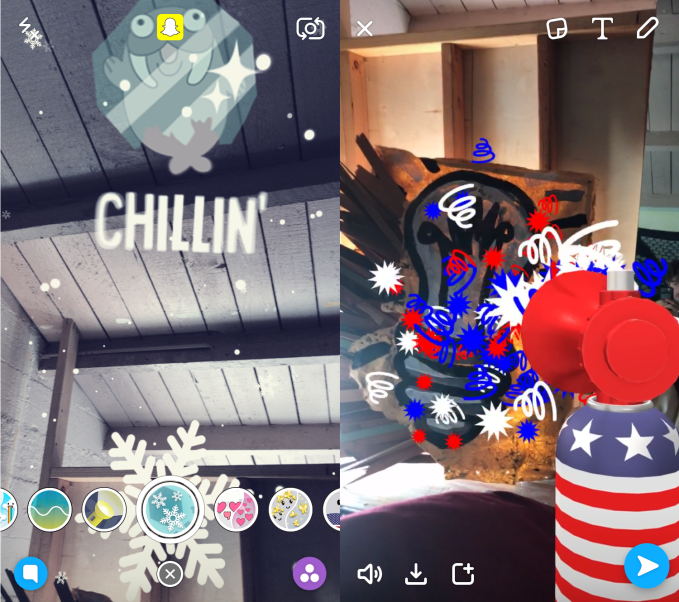
Today’s Snapchat update for iOS and Android introduces World Lenses. While its well-known Selfie Lenses change the way you look with dog ears and flower crowns, World Lenses change your surroundings. For example, you can add a sleepy cloud that rains down rainbow puke if you point your camera at the sky. Some World Lenses will actually animate your face too, and can have different effects depending on if you use your front- or rear-facing camera.
The new World Lenses will be available alongside the Selfie Lenses you can swipe through once you tap on the camera screen. Snapchat tells me “World Lenses will help Snapchatters decorate the world around them in even more fun and creative ways.” It already showed one off with a “Go Vote” airhorn this Sunday, and has now added flashlight, snow, floating hearts, and other World Lenses.
You can imagine how World Lenses could be fun to play with on Snapchat’s upcoming Spectacles sun glasses. Since you’ll be looking at your environment as you navigate through your day, and can’t really shoot selfies with Spectacles, World Lenses could help you spice up what your Specs capture.
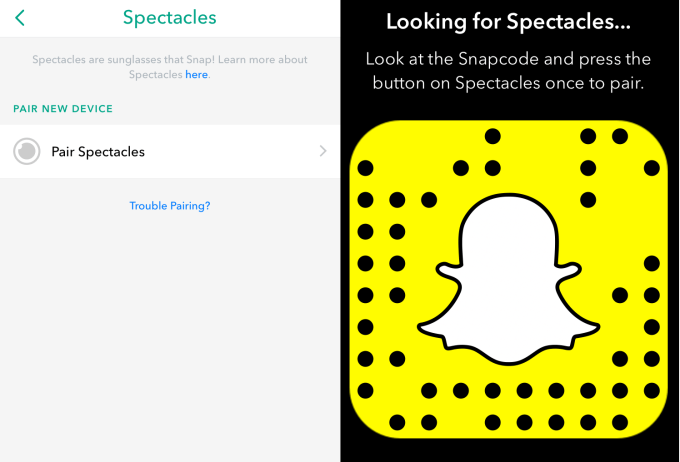
Snapchat is readily preparing for the Spectacles launch. Just yesterday I spotted adds for the glasses in the security bins at LAX airport. And now there’s an option in the Snapchat app’s menu for pairing your Spectacles. You’ll just have to press the button on your Spectacles while pointing them at a special QR Snapcode on your app.
pair-snapchat-spectacles
With new Lenses and Spectacles coming, you might see Stories that are too cool to keep to yourself. Luckily now there’s the option to tap on a friend’s Story or Live Story and send it as a snap to someone else. You could already do this with Discover stories by now every Story can be shared.
Finally, Snapchat is co-opting perhaps my favorite feature of Instagram Stories — the ability to rewind. Now you can tap on the left side of the screen to rewind one snap, and swipe left to go back to the start of the Story you’re watching. Previously you’d have to dig down into your already-watched Story list to rewatch something you missed. So if something awesome slips by, now you can rewind and share it with friends.
Re-sharing is important for Snapchat creators because there’s no good way to discover them in the app since it lacks any suggestions of who to follow or an Explore page like Instagram. While that does avoid Snapchat dictating what’s cool, it also makes it tough for creators to build an audience. Those creators are who keep fans coming back to Snapchat, so building features to assist them could boost their loyalty at a time when they might be tempted to post Instagram Stories.
augmented-world-lenses
World Lenses let you add weather and other crazy effects to your surroundings
Though it doesn’t have enormous financial backing like Instagram, Snapchat has built a strong lead in mind share, becoming synonymous with augmented portraits even though Facebook bought its own selfie mask startup MSQRD.
This kind of rapid product development will be essential for Snapchat now that it’s competing with Instagram Stories. Instagram CEO Kevin Systrom admitted to me his app’s version of Stories was directly taken from Snapchat and “They deserve all the credit.” But with 100 million people already using Instagram Stories, origin might not matter as much as which app executes best.

Monday, 5 September 2016

Exploring The Most Cost Effective Online Marketing Channels


What are the best online marketing channels? There isn’t a straightforward answer to this question. Every business is different. But, there are certain channels that tend to be more cost-effective and provide higher conversion rates.
If you are looking for a way to stretch your online marketing budget, then explore the most cost effective online marketing channels.
Here’s a quick overview of the online marketing channels that’ll be covered:
  • Email marketing
  • Pay-per-click advertising
  • Social media advertising
  • Blogging
Email Marketing
For some reason, many entrepreneurs believe that email marketing is outdated or ineffective. This is simply not true. Email marketing remains the most cost-effective way to increase conversion rates and boost sales.
Compared to all other online marketing channels, email marketing offers the lowest cost per lead. While social media platforms, such as Facebook and Twitter, have millions of users, everyone has an email address.
As long as you’re smart about your email marketing strategy, you will get positive results.
Make sure that your emails encourage your subscribers to take action. This could include visiting your website or purchasing a product or service. You should also create a sense of urgency in your emails.
Also, don’t ever purchase an email list. You should always build your own list using opt-in forms and other methods.
PPC Advertising
Pay-per-click (PPC) advertising is another marketing channel that is thought of as being past its prime. Again, this isn’t true. PPC is affordable and effective. You just need to optimize your PPC campaign.
Before you put together your PPC campaign, you need to perform thorough keyword research. The key to an effective PPC campaign is choosing the right keywords. Use the Google AdWords Keyword Planner to research keywords and find phrases with low competition and medium search volume.
Along with keyword research, you need to have a title and description that grabs attention. You have limited space available. Your title and description used in your PPC advertisement shouldn’t be vague. It should be clear and direct.
By having a clear message in your PPC ad, you’ll naturally notice higher conversion rates. Focus on a specific demographic and speak directly to the customer.
Social Media Advertising
While email marketing and PPC advertising have been around since the beginning of online marketing, social media marketing is relatively new by comparison. There are two methods of using social media as a part of your online marketing strategy – regular activity and advertising.
First, you should be active on social media. Create a schedule for sending out new posts or tweets. This helps you build your subscriber or follower base.
Along with regular activity, you should include social media advertising in your marketing strategy. This could include Facebook Ads, promoted Tweets on Twitter, and advertisements on LinkedIn.
As with PPC advertising, you’ll need to optimize these advertisements to increase conversion rates. Again, use Google AdWords Keyword Planner Tool to find the most effective keywords. Focus on a niche category.
Blogging
Here’s one more online marketing channel to include in your overall strategy – blogging. Blogging is extremely cost effective. You likely already have a website. You just need to start adding regular blog posts.
Blog posts can be shared on social media, linked to from advertisements, and are incredibly beneficial from an SEO standpoint. Blog about topics relevant to your products or services.
You should also create a schedule for your blog posts. With a regular schedule, visitors will know when to come back for more posts. This increases repeat traffic and allows you to develop a loyal group of followers while also establishing yourself as a voice of authority in your niche market.
As you start developing and refining your online marketing strategy, consider using the marketing channels described above. Along with these tips, don’t forget to check out my simple lead generation system. Click here to learn more about my done-for-you system.
Feel free to add some more, I know there's plenty out there!
Regards,
Mark Swift

Wednesday, 31 August 2016

Why Should Marketers Consider Dynamic Ads On LinkedIn?

Why Should Marketers Consider Dynamic Ads On LinkedIn?
Are you a B2B marketer?
Want to deliver personalized messages to engage with your audience?
LinkedIn provides a great solution with its Dynamic Ads feature. In this article, let us see why marketers should consider Dynamic Ads for their B2B marketing.

There Are 4 Steps Leading To Success In Digital Marketing:

  1. Define your goal
  2. Target the right people
  3. Engage them with content
  4. Optimize your impact
Targeting and engaging with the right people are the steps that a marketer should concentrate more on. Because it is a well-known fact that message relevancy is the key factor, when it is about connecting with targeted users. The success or failure of a digital marketer is decided by the relevancy of their message. If marketers are not reaching the relevant users, they cannot make what they want.
Nowadays, the online user behavior cannot be predicted with a manual effort. On the other hand, the competition is increasing. You have to compete with many other marketers who also try to grab the attention of the users.
60% of the marketers say that reaching the right audience with a right message is their top priority in digital marketing. But many marketers are struggling with creating an engagement with their targeted users. Among the 433 million users in the community, it is a bit difficult to target the right people.

Dynamic Ads

To help its marketing users, LinkedIn has rolled out Dynamic Ads feature and now it makes some changes to this beautiful feature. With these new updates, marketers can have a new feel and they can place their calls-to-action and images prominently. So that, they can drive the engagement with the right users.
LinkedIn Dynamic Ads

Why LinkedIn Dynamic Ads?

There are three main things that you can do with the help of LinkedIn Dynamic Ads. They are
  1. Target the Right Audience Who Matter Your Business

LinkedIn gives you a form where you can select your targeted audiences. This contains a wide range of criteria for targeting. That includes company, skills, interests, location etc.
  1. Performance Measurement

Measuring performance is needed for any campaign. Unless you know the performance of the campaign, you cannot take a decision further. LinkedIn gives you precise metrics of your performance.
  1. Increase Your Follower Count

You can place calls-to-action like “Follow Company” which can get you new followers. So, you can easily increase your follower count on LinkedIn.
Place calls-to-action like “Follow Company” which increases your followers on LinkedIn
To know how better the results of LinkedIn Dynamic Ads would be, here we are giving you a success story of CA Technologies on LinkedIn. Take a look.

CA Technologies

CA technologies, a leading software solutions enterprise, wants to drive leads. It has developed a great content that is downloadable, targeting the high-level decision makers in the IT sector. Their challenge lies in getting clicks from these high-quality leads.
ca-technologies-linkedin-page
To drive leads for its enterprise software solutions, CA Technologies developed relevant, downloadable content targeted to high-level IT decision-makers. The challenge was getting these high-quality leads to convert from clicks.

What Did They Do?

They used the best in their marketing strategy. They used LinkedIn’s dynamic ads for their advertising. Dynamic ads link the member’s profile picture with the name and message of a brand. As per the Digital Marketing Head of the company, LinkedIn’s Dynamic ads are eye-catching and visually appealing. With the dynamic ads, they could promote their content in a better way as they were able to add more ad copy.
Linkedin-dynamic-ads3

What Was The Result?

CA Technologies got outstanding results for its dynamic ad campaign. The campaign has resulted in a conversion rate of 11.3%. The cost per lead was 68% less when compared to other social media platforms. On this great success, the digital marketing head of CAT says that they were pretty sure their content reached the right audience, resulting great conversion rates. And also said that they shifted their marketing budget to LinkedIn from other social platforms, owing to the great results.
Why Should Marketers Consider Dynamic Ads On LinkedIn?
If you are new to advertising on LinkedIn, dynamic ads can be helpful for you in delivering personalized content to your targeted users with creative ads. To create customized templates, marketers are using the native ad format. These templates can be populated dynamically with relevant content like skills, interests etc and profile images of the user who are viewing the ad. Depending on the contextual elements of what the user is viewing, the content can be optimized. 
Dynamic ads can achieve a variety of ad objectives such as driving conversions, getting new followers for your LinkedIn company or showcase page and display job notifications. 

Conclusion

Reaching the relevant users with relevant content is the main advantage that you can get with LinkedIn’s dynamic ads. You might be using the general ad features of LinkedIn. Though they help you in reaching a large number of users, we are not sure how many of them matter for your business. But with dynamic ads, you reach only the users who matter the most for you.
This is the thing that separates the dynamic ads from other ad features of LinkedIn.

Monday, 22 August 2016

Top 10 Profile Photo and Portrait Hacks Based on Science

girl with pearl earring - two views
Are you planning to shoot a new profile photo or publicity headshot? Or, are you trying to choose the best image from a group of possible shots? There’s some surprising science to help you plan your shoot and pick a winner.
The best thing about these tips is that their effect is almost always non-conscious. The viewer won’t consciously realize that your photo appears more trustworthy or more attractive because of the content or composition. And, your photographer probably doesn’t know most of them.

1. Profile Photo Lessons from da Vinci

Unless you are obsessive about art and portraiture, you probably never noticed that for centuries artists have preferred to show the left side of their subjects’ faces. 
One compilation of studies showed that for female subjects the bias ran as high as 78%. Male portraits were less skewed, but still showed at least a 56% bias toward the left side.
mona lisa the original profile photo
Scientists at Wake Forest University conducted a series of experiments that showed both conscious and non-conscious preference for images showing the left side of the subject’s face. The left-side preference was true both for verbal statements of preference as well as unconscious pupil dilation.
What’s going on? Our faces and expressions aren’t perfectly symmetrical, and part of the reason is that our right and left brain hemispheres don’t have identical functions. The right hemisphere controls the left side of our body and is also associated more with emotion. The conclusion of most scientists who have looked at the preference for left-side images is that the left side of our faces expresses more emotion.
left-right faces
One reason artists have chosen to portray men from the right side more often than women is that the less emotional right side may perceived as higher in dominance and self-control. Another study looked specifically at drawings by Leonardo da Vinci and found that subjects portrayed by right-side images were considered more “potent” and “active.”
Recommendation. Unless you feel a need to project self-control and power, use an image that emphasizes the left side of your face. It will make you slightly more attractive and, perhaps, approachable.
Study: one side of your face makes you look better. #Neuromarketing pic.twitter.com/6pAgM0X9qr CLICK TO TWEET

2. Keep Your Eye On Your Eyes

Want to be more attractive and trustworthy, at least in your profile photo? An image with larger pupils will do the trick. 
eyes - pupils
Subjects were asked to rate a video image of a person for trust. Unbeknownst to the subjects, the researchers digitally modified the size of the pupils of the person on the screen. Not only did the subjects rate that person as more trustworthy when that person’s pupils were larger, the subjects’ own pupils dilated to match the screen image.
Photo shoot lighting is often working against you from a pupil-size standpoint, as bright lights cause your pupils to shrink. So do pre-flashes for red-eye prevention.
Recommendation. When it comes to pupils, bigger is better. To increase trust, bump up the size of your pupils in your profile photo. Your photographer may be able to reduce the tiny pupil effect with low level modeling lights. Or, do what the scientists did – enlarge the pupils with digital editing tools.
Top 10 ways to hack your profile photo, based on science. #Neuromarketing pic.twitter.com/6pAgM0X9qr CLICK TO TWEET

3. What’s a Limbal Ring?

If you aren’t an opthamalogist or Jeopardy champion, you may not know what the limbal ring is. In fact, it’s the dark edge around the perimeter of your eye’s iris that forms the border with the white surrounding area. Another set of experiments (also described in Eyes Are The Door to Trust. Attractiveness, Too), showed that a thicker limbal ring made people more attractive to viewers of the opposite gender. The scientists postulated that a thicker limbal ring is a marker for youth and health.
limbal ring comparison
Recommendation.While you’ve got Photoshop open to tweak your pupil sizes, consider enhancing your limbal ring. It might make your profile photo bit more attractive. 

4. Can You Say Cheese?

Should you smile for your profile photo? Would a serious expression be better?
Obviously, this decision depends in part on the conscious image you want to portray. A candidate for a senior judicial position probably doesn’t want the photo to catch her in the middle of a huge guffaw. But, science can weigh in here, too.
One study by Brian Knutson looked at how the expression of the person in a photo affected perception of “dominance” and “affiliation.” These are two metrics used by psychologists interested in social organization. Affiliation is a positive characteristic, indicating factors like friendliness, openness, and a need to interact with others.
knutson emotio expression
Smiling images ranked high for both dominance and affiliation. That’s likely the quadrant most of us want to be in when viewed by potential customers, business partners, and so on. Images in which the subject showed anger or disgust also scored high for dominance but were low on affiliation. While such obvious displays of negative emotion aren’t common in headshots or social media images, a very stern/serious image would likely show similar characteristics.
Most of us wouldn’t choose a profile picture showing sadness or fear. Knutson’s work shows why: images with these emotions scored low both on dominance and affiliation.
Recommendation. Include a confident smile in your profile photo. By increasing your dominance and affiliation levels, you will seem like the kind of person others should connect to.

5. Trust Me, I’m Smiling

Smiling profile images are also good for trust. As I described in Unconscious Trust Formed in Milliseconds, a face with smiling mouth and slightly surprised eyebrows was found to be more trustworthy than neutral or scowling faces.
trust and faces
That post also references research on first impressions. While we form them in milliseconds, they can be surprisingly slow to change once formed.
Recommendation. If building trust is your goal, a small smile on your profile photo may be more effective than a big one. And, check your eyebrows. A look of slight surprise will curve them a bit to further maximize trust.
Research: smiling increases attractiveness and trust. #Neuromarketing pic.twitter.com/fsnaCAXBAD CLICK TO TWEET

6. Get Smart

Being seen as smart is usually desirable, and it turns out you can influence your perceived intelligence with your profile picture too. Once again, the answer is smiling. A 2014 study found,
Faces that are perceived as highly intelligent are rather prolonged with a broader distance between the eyes, a larger nose, a slight upturn to the corners of the mouth, and a sharper, pointing, less rounded chin.
small smile means smart
While some of these facial characteristics are out of your control, a small smile is easily achieved. 
One odd finding of this study was that viewers could actually predict the intelligence of male subjects from their photos, while for female subjects there was no correlation between predicted intelligence and actual IQ.
Recommendation. A small smile might make you seem smarter (and, as noted above, more trustworthy), while a bigger smile might boost your dominance and friendliness. Dial your smile up or down depending on the impression you are trying to make.

7. When Guys Shouldn’t Smile

There’s one domain where smiles work for women, but not for men – sexual attraction. One study, amusingly titled Happy Guys Finish Last, had subjects of one gender view photos of the other gender. The photos displayed different emotions. The subjects then rated how attractive the pictured people were. 
While happiness was the most attractive emotion for photos of women being viewed by men, it was one of the least attractive for men being viewed by women. Oddly, perhaps, shame and pride were almost equally attractive male emotions.
emotions and your profile photo
Recommendation. While smiles are almost always a positive for profile photos, men whose interests include dating should tone down the happy smile. Better yet, save the open smile for professional sites like LinkedIn and experiment with less happy imagery on dating sites. Women can smile regardless of their professional or personal objectives.

8. Look at Me!

Have you ever had a photographer tell you to look at something other than the camera? Her hand, perhaps, or a distant object? This may make for an artistic photo, but might not be your best profile picture choice. Scientists in the UK and Australia found that a direct gaze was most attractive.
Viewers preferred photos in which the subject looked directly at the camera and rated those subjects as more attractive. This bias for direct vs. averted gaze photos held both for attractive subjects and less attractive subjects. (I’m imagining an ad in the campus newspaper that said, “Unattractive people needed for psychology experiment. Apply with photo.”)
Gaze direction
The researchers attributed the direct gaze as a social cue indicating a desire to connect with the viewer.
Where should your eyes be looking in your profile photo? Science tells you. CLICK TO TWEET
Recommendation. Unless you’ve got a good reason to be gazing in another direction, look into the camera. You’ll be more attractive, regardless of how gorgeous/handsome you are. Or aren’t.

9. Cocktail Hour Photo Shoot?

This study result may surprise you. Researchers took photographs of subjects under three conditions of alcohol consumption: none at all, a low dose, and a high dose. (To be clear, it was the subjects consuming the alcohol, not the researchers. As far as we know.) The scientists then had other subjects evaluate the photos and rate the individual portrayed for attractiveness. 
Surprisingly, the subjects who consumed a modest amount of alcohol received the highest attractiveness ratings. The high dose alcohol subjects were the least attractive.
alcohol can make you attractive
Why does having a drink make you more attractive? The researchers speculated that the subjects might be slightly more relaxed, or that a facial flush added a bit of robust color to their image.
The right dose is an important factor, obviously, and depends on the weight of the individual. For more discussion, see Want to Be More Attractive? Science Says Have a Drink.
Recommendation. If you don’t have a problem with an occasional adult beverage, consider a “low dose” before your next photo shoot. Don’t overdo it, of course – check the chart below to get your optimal amount, and read my original post for more details.
optimum alcohol chart

10. Don’t be an Idiot

Science gives, and it takes away. Now that you have permission to savor that glass of pinot noir before your next photo shoot, I’m going to give you the negative side of alcohol as it relates to your profile pic. 
Your are likely a fun-loving person who lives life to the fullest. So, why not show that you aren’t 24/7 business by toasting your profile viewers with a nice glass of wine? In fact, you are better off drinking that beverage than using it in a profile photo. 
In my Forbes piece, Proof: Alcohol Makes You (Look) Dumb, I describe a study showed that subjects who viewed identical photos of people with and without alcohol rated the former as lower in intelligence.
wine-coke-none
The authors of the original study termed this phenomenon as the “Imbibing Idiot Bias.” They think that viewers associate alcohol with cognitive impairment. Even in the absence of any impaired behavior or even consumption, the cognitive damage contained in the glass transfers to its hapless holder.
Save the image of you enjoying a margarita in an amazing oceanfront cafe for your Facebook friends. Keep your profile pictures alcohol-free, unless you are a professional sommelier, micro-brewery founder, or have a similar reason to display your adult beverage savvy.

Bonus! 11. Model the Emotion You Want to Generate

We’ve already heard about the advantages of smiling. But, perhaps you want your viewers to experience a particular emotion. Maybe you want to make them angry, as many politicians strive to do with voters. In that case, a photo with that same emotion can have that effect.
angry woman
A study in Sweden exposed subjects to very brief images of face icons with different expressions – happy, neutral, and angry. The images were shown for only 30 milliseconds, too slow to be consciously processed by the subjects. Nevertheless, the facial muscles of the subjects contracted to mimic the emotion they saw.
We know from work by Ekman and others that our facial muscles can change our emotional state to match, so getting a viewer’s face to scrunch in anger will tend to make them more angry than before.
The study also shows the surprising power of non-conscious image processing.
Recommendation. If you are trying to create a particular emotion in your viewers, wear a matching expression in your own photo to invoke the facial mimicry effect.
Top 10 ways to hack your profile photo, based on science. #Neuromarketing pic.twitter.com/6pAgM0X9qr CLICK TO TWEET
Your social profile photo or publicity headshot makes a bigger difference than you might expect. Take the time to optimize the details, and you’ll impress your viewers in the way you want and your business needs.

Wednesday, 17 August 2016

Developing a Conversion Funnel to Increase Sales


If you want a solid marketing campaign that generates positive sales, you should consider using a conversion funnel. This is a tool that is often used by successful internet marketers. By learning how to build a conversion funnel, you’ll be able to create a structured campaign that actually converts.
Here is a simple guide for developing a conversion funnel for your next marketing campaign.
What is a Conversion Funnel?
First off, what is a conversion funnel? It’s a structured outline of your method for acquiring new customers and completing a sale. You’re funnelling your potential customers through a planned campaign, starting with the acquisition and ending with a sale or inquiry.
The reason for the funnel shape is that the number of prospective customers drops off the further along you go. You can then determine where the largest drop-off occurs and come up with solutions for fixing the leak in the funnel.
For example, you may get 1,000 visitors to reach your landing page. Half of those visitors may follow through with the next action, such as subscribing to your email list. Half of those subscribers may follow the link in your next email. The number trickles down until you reach your final conversion rate.
The standard conversion funnel can be broken down as follows:
  • Attraction
  • Interest
  • Desire
  • Action
You first need to attract potential customers. This is done through your standard marketing channels, such as PPC ads, press releases, social media marketing, and search engine optimization. From there, you need to capture their interest, such as with a landing page.
You then use desire in your calls to action to get them to move to the next step – completing an action. The intended action is usually a purchase or contacting you to learn more about your offer.
Attracting the Right Customers
The first part of the funnel is attracting potential customers. You need to attract the right customers to boost your conversion rates and make your funnel more effective. There are multiple solutions for this. You can perform market research to learn more about the interests of your prospective customers.
You could also focus on the copy used in your advertisements and marketing. Use long-tail keywords to narrow the focus of your advertisements. Targeting a niche category within your industry is always a good method for attracting the right customers.
Build Interest and Desire
Building interest and desire gets accomplished through landing pages and emails. Your landing pages should build interest in the solution that you’re providing. Your goal should be to gain subscribers. You can include a call to action on your landing page to complete a sale, but include an opt-in form for subscribing.
Some of your visitors may not be interested in making a purchase right away. But, you could still end up getting their email address. This is an essential part of the funnel. You’ll need to create an email marketing campaign for targeting visitors that left without making a purchase.
Send a Follow Up Email
You can attempt to plug the leak in your funnel by sending follow up emails. The opt-in form that you include on your landing page should be separate from your other subscriber lists. Create a follow-up email that you can send to these visitors.
Your follow-up email should build the desire to come back to your website and complete a purchase. You could include an additional offer, discount, or promotional code to entice the visitor back to your website.
Create an Effective Call to Action
The final part of increasing sales through a conversion funnel is to create a killer call to action. Your call to action needs to convert. If you need help creating an effective call to action, use split testing to fine-tune your final message.
Conversion funnels are incredibly effective at increasing the effectiveness of your marketing campaign. It makes it easier to keep your campaign structured and maximise your conversion rates.
You can easily look at each stage of your conversion funnel – advertisement, landing page, email, and sale, to determine which area needs to be optimised. Focus on the areas where your potential customers start to drop-off and then come up with a solution to plug the leak and improve your funnel.
You can develop your own conversion funnel now or for additional internet marketing tips – click on the following link and learn more about my done-for-you system.