17 Minutes Only!

Showing posts with label Traffic generation. Show all posts

Wednesday, 13 July 2016

4 Potent Ways to Promote Your Blog to Get More Traffic

So you’ve written a blog post. Do you sit back and wait for people to come?
Well, you could if you’re willing to wait for search engines to find it. And even then, unless you are already considered by search engines as A Very Important Website, your post is not likely to be found in the first few pages of search results as there is too much competition.
What this translates into is no traffic.
Doing a bit of self-promotion in a way that is human and adds value to others, is a great idea to increase eyeballs on your blog.
So we’ll deal with 5 ways to do this, but first let’s focus on getting the content portion right. And I only mention that because so many bloggers fail at it. But the consequence of not getting the content bit right means you’ll probably just waste your time promoting it.

Get the Content Bit Right First

What do I mean by “getting the content bit” right first?
Well, your content needs to be written for the right audience - those who will eventually buy something from you, and the content also needs to be optimized. For instance, the usual stock images won’t attract attention, so you’d need to do some customization.
I am not going to expand on the subject of content here, but Neil Patel, Internet Marketing Guru, has written a post about how to create a blog properly, and the steps about content are thorough.

4 Solid Blog Promotion Ideas

There are many ways you can promote your blog and posts, but the following four methods are some of the most potent ways to bring in more traffic, when they are done properly.
To avoid repetition in each method, every one of these points, bar paid search, requires two specific elements, the first one of which is this: all blog promoting you do needs to provide value to others. Never, ever blatantly market your wares.
The key with online marketing is:
a) to be human, and
b) to promote links in a way that’s natural; woven with grace and dignity into value-add content.
The second specific element that makes these ideas work - all four of ‘em, is that they all need to be centered around your target audience. If they are not, you will get traffic, but it won’t be the right kind of traffic. The right kind of traffic are the people that will eventually buy from you.
Traffic for the sake of traffic is, well, just plain stoopid.

#1: Link from Q and A forums

Find niche forums where you know your target audience waffle around, so that you get their eyeballs on your content.
There’s no shortage of forums online; here are four of the most popular:
  1. Quora
  2. Mosaichub
  3. Yahoo Answers
  4. Askville
When you register, make sure you complete your profile, so that people who may be interested to get in touch will know how to find you, or get more information about you.
Then go ahead and find questions you can answer, that your target audience are searching for. Provide answers that are sincere and value-add. Some answers may require brevity, while others can be mini blog posts.
Here’s an example of a value-add answer on Quora. You can see the writer has included a link to content, but has done so in a natural way that is not blatant promotion:
Skills requirements to make it work:
  • You’ve got to be a good writer

#2: Link from social media

Link to your blog posts or other value-add pages from your social media accounts. But again, only use accounts where your target audience hang out.
This method can be used at no cost, or depending on the account (some offer this function while other’s don’t) give it a boost by paying a small amount.
Because it’s such a popular method of promotion, many social media tools have been developed to make tasks easier.
The important thing with linking from social media to your blog is that you use images and/or video. Images attract attention, but they can’t just be stock images like this one:
A stock photo image can do more harm than good.
Whereas the next image has been customized. Canva is a versatile tool that can be used by people who aren’t graphic designers:
This image has been customized and will attract more attention
than stock photos on social media
Quicksprout offers a full-on social media and blogging guide as to how to do this, so I won’t go into more detail here.
Skills requirements to make it work:
  • Basic graphic design
  • Social media knowledge

#3: Link from paid search

Paid search is the only promotional method listed here that requires some financial outlay, but it’s minimal compared to offline paid advertising, so you still win, as long as your target audience is searching for stuff online.
Paid search methods include:
  • Google Adwords
  • Bing Ads
  • Yahoo Search Ads
The most difficult part of paid search is choosing keywords that people use to find whatever you’re offering.
Use paid search to send people to a blog post, or if you’re having a promotion for instance, you’d need to set up a landing page to send traffic to. A landing page is a dedicated, standalone page that contains no distractions and is very focused on getting the reader to perform one action. You’d use a landing page if you wanted higher conversions.
Get the lowdown on paid search and how to do it with Wordstream’s helpful “how to”.
Skills requirements to make it work:
  • Keyword research
  • If using a landing page, you’d need these skills: copywriting, graphic design, technical know-how. Or hire a pro.

#4: Comment on other blog posts

Probably the simplest method of all, is to simply add a comment on other blog posts in the same niche.
At the risk of being repetitive...make sure your comment adds some kind of value, otherwise it won’t attract attention.
Here’s an example of a value-add comment made on Neil Patel’s blog:
Skills requirements to make it work:
  • You need to be a decent writer, because your comment represents your brand

In Conclusion

Once you've published a blog post that's been written for the right people, there are ways to get the news "out there" so that search engines index your content faster because of the links from other big sites, and also to get more eyeballs to your blog, but you always need to add value to readers, and add links to your blog in a natural way.
Always focus on your reader so that you provide content that is useful.

Thursday, 19 May 2016

Our bias for paid marketing

A few rhetorical questions:
Is a physical therapist with a professional logo better than one with a handmade sign?
Are you more likely to stay at a hotel that you've heard of as opposed to an unknown one, even if 'heard of' refers to the fact that they've run ads?
Do you believe that companies that rank higher in search results are better than the ones a few pages later? And if you don't, then what's the reason we so often stop clicking after one page?
There are more ways than ever to spread the word about your work, but we live in a culture where paid ads still have clout.
"As Seen on TV" was such a powerful phrase that companies brag about it, right on the box. And that connection between paying for attention and quality still remains.
Over time, we've been sufficiently seduced by marketers that spend on the surface stuff that cognitive dissonance has persuaded us that we must be making those choices for a reason.
Find the discipline to build your projects like you won't be able to run ads to make them succeed. A product that sells itself, that's remarkable, that spreads.
Then consider running ads as if you don't need them

Tuesday, 5 April 2016

8 Easy Steps to Take Your Website From No Traffic to Non Stop Visitors

5c334374-5d0f-4095-b8b3-3b33670f4163Guest post from Corianne Burton from N2Q Consulting
So, you have a website and – you’re proud to say – it’s a sharp one. Now what? Although it would be great if they did, visits don’t always just start rolling in on their own. Oftentimes, it takes strategic planning and careful attention to get the ball rolling at the speed you’d like.
Many of these efforts and checkpoints you can implement right away, on your own. Some of these foundational tactics take a bit longer to see a return on, and it would be best to bring on a professional to oversee the process – but they are worth the extra effort, up front (I’m looking at you, SEO). Here are 8 easy steps to start increasing your traffic, today:

Test drive your website

First, before you try anything else: think like a user that has no prior knowledge of your company and start clicking around. Take note of any external and internal links that might be broken, or pages that might lead you in a frustrating circle. Make sure that every time you click to a new page of your site, there’s a way to get back to where you started, or a clear call to action to keep you moving on. Subscribe to your own blog, send yourself an inquiry on your contact form, and complete a test order if you have an ecommerce site. It’s imperative that you have firsthand knowledge of your site flow, and are confident in the paths you are setting out for users to take.

Go organic

Search bots scan your website and report what they find back to the search engines. This lets the search engines know what content you have on your site, so they know what sort of organic (unpaid) searches to send your way. Google is all about user experience and intention, and providing results that meet the need of the query. If you provide exceptional, unique content that shows Google you know what you’re talking about, they’ll respond accordingly. You can optimize your site for important keyword phrases and organic traffic by updating important metadata, but you should also be identifying your target audience and researching your competition to find important keyword opportunities you could be missing out on. Doing this helps you to know where you currently stand in terms of organic traffic and opportunity, where you can optimize your messaging to better attract that specific audience, and where your competitors are at in this same process.

Start a blog

Your company should have a blog, and here’s why: Google loves thought-leading content that establishes you as a resource in your field. You should update your blog frequently, and consistently, and you should appeal to your target audience with unique, innovative content that meets a specific need – don’t just republish industry news or press releases, although some of that works, too. Ask yourself: what would your customers want to read? Determine what keywords are sending traffic to your site, find the demand in your line of work, and create an editorial calendar around those topics. Then, get to consistently publishing so Google will take notice.

Get your name out there

Publishing articles on other relevant websites is a great way to build your industry connections, reach a new audience, and drive new traffic to your site. You just need some time, applicable industry research, and a well-written email to show others the value in a content partnership with your site. Look for sites that are part of your industry without being direct competition; readers can check out the article and come straight to your site for further engagement or to reach out with questions.

Engage your social media following

Add social share buttons to your content. This makes it easy for readers to share your content with their own audience and get the conversation started (or keep it going) on social media. You can track your social media referrals in Google Analytics, so pay attention to which outlet has the best return and invest some money into promoting posts or pins or tweets, accordingly.

Check out popular industry websites

Reach out to industry websites that receive a significant amount of traffic and establish a connection with them. Compliment this mission, their messaging, their product, or their approach. Ask about getting added to a directory they have, or to include you in a list of partners or trusted resources. You can also visit the website’s blog and leave some genuine, engaged comments on their articles. This is an excellent way to push traffic to your site.

Join an affiliate program

Affiliate programs work to promote your business to their networks. For each sale your website receives through the affiliate program recommendation, you pay a small fee.

Utilize pay per click advertising or email marketing

Although not ideal for consistently driving a substantial amount of traffic, Google Adwords pay-per-click (PPC) advertising is a great investment for some immediate and targeted traffic. If you’d rather not invest additional resources into ads, have an option for visitors to sign-up for a mailing list. Send out newsletters, opt-in incentive for free products, or time-sensitive coupons for subscribers. Each email or newsletter should refer readers to your website for additional information.
If it were easy, everyone would be have thousands and thousands of unique visitors every single day, but it’s all about determining what works best for you in your industry. We highly recommend starting from the top of the list, and working your way down. Sound off in the comments – we’d love to hear what’s worked for you!

Saturday, 2 January 2016

An Easy Way To Get a 205% Boost In Search Engine Traffic

Your TITLE on your blog posts can make a huge difference to your rankings.
You know you need to rank.
You need that ‘google traffic‘.
It’s how you’re going to get leads cheaply, and for a long time, so it’s important to know as much as you can about SEO.
What if I told you that you could improve your rankings by changing a couple of words in your title?
You can. It’s easy, I’ve done it.

how to boost search engine traffic
Well, to start off with let’s think about how Google ranks pages.
Google ranks pages to match up to people’s search terms. Terms which, by the way, are ever changing. As society changes and trends rise and fall the WORDS people type into search engines change.


In order to stay always on top you need to show Google that your site is better than all of the others. Content is part of this situation.
Your CONTENT, that is the actual ‘stuff’ on your page needs to be great. It can’t be mediocre in today’s world. It needs to be unique, interesting, helpful, easy to read and free. So you work hard to get all of that stuff on the page, and usually what happens is you give it an average title.

Your Blog Post Title

Now, the title of your blog post can be argued to be THE most important thing about your post. Why?
It’s the first, and in many cases the last thing your readers will ever see about your blog. If someone sees your title in the SERPS and doesn’t click it, that’s very bad. Your title needs to draw people in like a magnet.
Now, what invariably happens is that as people learn about online business, SEO and so forth, they’ll have it drilled into them that ‘keywords are key’ and you need to put your keywords in your title, somewhere near the start.
This is somewhat true, but what’s even more important?
Well sure keywords are important.
You should always have the keywords you want to be found for somewhere on your page, preferably more than once and in different formats (meta tags, alt text, headings and in content) but if no-one clicks your page then it doesn’t matter.
If people are clicking OTHER sites over yours, and they KEEP doing this, then after a while your site sinks down further, and this in turns gives you less chance to be clicked on and it’s a horrible cycle to get into.
You want to make sure that when Google ‘tests’ your site (they show your site nearer the top for a short period of time to test how many people click it and like it) it performs well.
Google has been known to show new sites or posts higher in the search results for a short period of time to test the click through rate, and how long people stay on your page. If your content is great, they should want to stay on there for a while, right?
But they won’t get there in the first place if your title isn’t good enough.

A Case Study

I’ve got a niche website which I don’t want to reveal here as it’s not relevant to internet marketing but just by adding a number to the title, I increased the click through rate to WAY above the average and within a few weeks it was raking number one.
Not only that, but it was ranking number 1 ABOVE sites that had MORE links, MORE content and MORE social shares.
How Does That Happen?
Because more people (by far) clicked my post over the other ones, and when they got there, I had great content which kept them interested enough to keep reading. Click through rate is very important.
So, what was the title?
Without giving the niche away, I had a keywords which was very similar to this –
‘things to do in XXX’
‘XXX’ is my niche.
So my blog post TITLE was this –
“40 things to do in XXX, especially number 5”
Now, all of the other posts for this keyword has the keyword in the title in one way or another. None of them had my little addition of ‘especially number 5’.
People saw this (at the time it was raking on the second page, and then a few days later, bottom of page 1, then now the first result) and clicked it because they were curious.
They wanted to know what ‘number 5’ was! Then when they clicked there, they stayed to read because I had written a great article.
That ranking is still staying there. I’m still the number one post for that search term and several related ones and I’m ranking above other better sites. It’s been several months now and nothing’s changed. Maybe my competition haven’t thought about changing their title?
Okay, so we understand that titles are important.

So What Makes A Great Title?

Several things.

1 – Your Actual Keyword

This is important so that people know your post is about what they’re searching for, and it helps search engines to show your post at the right time
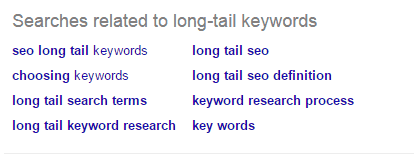
searches related to keywords - feature of Google

2 – Some Engaging Words or Phrases

Things that turn the experience from someone searching a load of random posts to a conversation. Think along the lines of if you were talking to a friend.
You wouldn’t say ’15 pictures of cats’ you’d probably say something like ‘Look at these pictures of cats, the last one is hilarious!’
Blog-Title-generator

3 – A Number

Numbers have been shown to increase click through rates. People like specific numbers.
For example, which one are you more likely to click on –
‘How to make money online’ or 
‘How I Started Making $4567.70 per hour from my room’
It makes it more relatable and interesting.
So that’s it for now, but next time you writer a blog post, think about the title you’re going to give it. Great titles can help your article get that boost it needs.


Important Note!

Make sure that no matter how great your title, your content is even BETTER. If you have a great title but terrible content then people will click on your site, then instantly click back to the search results.
This sends a signal to Google and after not too long they’ll put your further and further down the list. It’s known as ‘pogo sticking’ when a searcher jumps from your site right back to the search results and it tells the big G that they didn’t find what they were looking for.


What do you think?
Are you working hard on your blog post titles?
Please share your views in the comments below, thanks!

Monday, 9 November 2015

10 Ways To Get More Traffic To Your Blog Now

Every blogger will attest to this; It is very simple to create a blog. However, it is hard building it to get a sizable traffic. Any blog without traffic is not useful at all no matter the caliber of its content. It is so important to look for ways to gain traffic to your blog. May it be a corporate blog or personal blog; those seeking to monetize or to pass on information the readers through blogs must bring in web traffic first. Here are some ways you could bring in traffic.
Traffic Generation

1. GET INVOLVED IN AREAS WHERE YOUR AUDIENCE IS PRESENT ONLINE

Just like advertisers, you should know where to find your target audience online. Get to know the forums, websites and social communities where they are found. Several web-based tools can help you accomplish this. You are then able to interact with your audience in these platforms. For example, you could carry a message in a forum or a social site with a link back to your blog. It is highly probable that one of the readers will get interested and visit the blog.

2. TARGET THE AUDIENCE WITH THE ABILITY TO SPREAD THE WORD

Try to target the audience that is likely to evangelize your blog. Different groups would be more or less energetic to pass on the message to others. For example, content with infographics, videos and appealing photos would be best targeted on tech savvy groups that are very active on the net.

3. MAKE USE OF SOCIAL MEDIA

Social media programs have attracted hundreds of millions of accounts. Such platforms as Facebook, Twitter, Pinterest, LinkedIn, Google+ among others have such a huge following that if well-managed, you could get a vast amount of traffic to your blog. Open an account at the relevant platforms, write good excerpts and link them to your blog. Keep making friends and posting interesting stuff.

4. ANALYZE YOUR TRAFFIC

It is good to know where your traffic is coming from. Analysing the origin of the traffic will help you duplicate the efforts in future to achieve even better results. Concentrate more on sites that are bringing quality traffic. You can tell this by the amount of time that the readers are staying at your blog. Google Analytics is one of free analytical web tools you could use.

5. USE GRAPHICS AND PHOTOS

Try to make the experience of visitors to your site enjoyable. Adding graphics and photos would add a good twist to your blog experience. Ensure that they have back linking licenses. Visitors share this out (of course it links back to your blog) among their friends pulling in more traffic to your blog.

6. RESEARCH ON LIKELY KEYWORDS TO YOUR TOPIC

Keyword search helps you know what words internet users make use of when searching for related topics. It helps you use similar terms and words around the popular keywords. This increases the chances of getting a higher ranking in search results. Write a high quality article while using the keywords. However, avoid overusing keywords as they make your article look more or less like spam.

7. CREATE AN EMAIL SIGNATURE

A signature helps you tell others about your blog in a soft, less pushy method. It is simply a link put in signature settings of your email address. Unlike manual methods, you can assign an email signature and send a link to your blog in every email you send effortlessly. Try changing the style of your email signature to avoid people becoming blind to it.

8. MAKE USE OF COMMENTS SECTION

It is advisable to make great comments on other blogs. This is likely to interest readers who will click-through our details to your blog. Likewise, interact with great comment on your blogs. This way you are likely to make friends that will bring on valuable referrals to your blog.

9. ENABLE AND ENCOURAGE SUBSCRIPTIONS

Without subscriptions, there is little likelihood that visitor that who likes your posts will trace your blog in future for more posts. Subscriptions are a way of encouraging those that like your blog to visit when you put a new post. With time, you will grow consistent followers for your blogs. This is especially helpful when you’re promoting an affiliate business.

10. DESIGN YOUR BLOG ATTRACTIVELY

Visitors are likely to like your blog based on their ‘feel’ of your blog. A crisp, attractive blog is likely to get their attention and therefore receive more shares. Ensure that it is easy to understand and navigate.

Monday, 19 October 2015

A Step-by-Step Guide to Driving 10,000 Visitors a Month Through Pinterest

pinterest
Social media can be a great traffic source for almost any online business.
But which network is right for you?
For most businesses, it makes sense to start with the largest networks. No matter how narrow your audience is, it’s very likely you’ll find members of that audience active on these networks.
Download this step-by-step guide to drive 10,000 visitors a month through Pinterest.
This means that most businesses should start with one of the following:
  • Facebook
  • Pinterest
  • Twitter
  • LinkedIn
Although they are all huge, they are very different networks.
The best one for you will depend on your customers, your niche, and your marketing preferences. 
Pinterest is the second biggest driver of referral traffic by a large margin.
image06
Despite that, it doesn’t get as much attention as Facebook, Twitter, or LinkedIn.
This is mainly because it’s a unique network. Every single post on it is an image (with a short optional description).
Pinterest can be an amazing traffic source as long as you can create some sort of visual content in your niche.
And although it takes some time to learn how to use Pinterest effectively, it’s pretty simple once you understand it.
In this post, I’m going to show you how you can drive thousands of visitors a month to your website with Pinterest.

2 reasons why Pinterest is an amazing traffic source

The unique aspects of Pinterest are the reasons why Pinterest can be a great option for those businesses whose past social media marketing failed.
In particular, you need to understand two main reasons for using Pinterest to determine if it’s the right platform for you.
Reason #1 – Pins have great longevity: One of the problems with most social networks is that whatever you post stays visible only for a short period of time: anywhere from an hour to a few days at the most.
So even though you’re continually creating content on the network, you don’t benefit from it after you’ve initially posted it.
Seems like a waste, doesn’t it?
But Pinterest is different.
You can make a “pin” (share an image) that will continue to get views and shares over time.
It might not have the level of consistency that good search engine rankings have, but it’s much closer to achieving that kind of impact than any other social network.
If you’re active on Pinterest for a long time, the traffic will really add up.
For example, the food blog Pinch of Yum shared that they get about 500,000 visitors per month from Pinterest.
image20
Even if they stopped being active on the network, they would still get a large portion of that referral traffic for the foreseeable future.
Compare that to other networks, like Facebook and Twitter, where your traffic would take a nosedive shortly after you stop posting.
Reason #2 – Pinterest was designed for sharing: One of the reasons why pins live for so long is that users are always looking for more things to share.
This is what a typical Pinterest dashboard looks like when a user logs in:
image16
If a user likes a pin, they either “like” it or “repin” (share) it.
Good pictures can get hundreds or even thousands of repins.
Unlike other social networks, Pinterest isn’t about posting status updates about what happened during the day. It’s about sharing and consuming images and, by extension, content they link to.

Creating an account that attracts followers (3 key areas)

The first practical thing you need to know is how Pinterest works.
At first, it might seem a bit complex, but I promise that it’s fairly simple.
You start by creating an account, just like you would on any other social network.
When other users visit your profile, they’ll see something like this:
image01
Your profile is composed of 5 main areas:
  1. Your logo - If your logo is very plain, you might want to create a custom image instead.
  2. Your brand name – It should reflect your business, but you could also use a personal account with your name.
  3. Your website URL
  4. A description – A one- or two-line description that explains what you do.
  5. Boards – These boards act as silos for the content you share on Pinterest (your pins are kept inside, depending on how you tag them). You should create a board for each category of images you plan to share (you can do this later).
Setting up your account: To start with, go to Pinterest, and sign up for a new account. You’ll want to select “continue as a business” on the first screen (after you enter your email):
image18
Then, fill out the fields as usual:
image13
If at any point you want to change your profile, you can do so by navigating to your profile and clicking “Edit Profile” in the top right corner:
image15
Using Pinterest is simple: Like I mentioned before, there is only one type of content on Pinterest – “pins.”
A pin always consists of an image. It also typically has a description, which can also include hashtags.
image19
It’s a good idea to include keywords in your description so that you show up when people use the search bar on Pinterest (which they do quite often).
As you can see in the pin above, you can either “pin it” to share it or you can “like it.”
Users see a variety of pins all at once as small versions. They can click on those to see their full versions.
image26
Users can find pins using the search bar or looking through their feed.
Their feed consists of pins that the users they are following have posted (more on this later).
And that’s really all there is to using Pinterest at a basic level.

How to drive insane referral traffic with pins

Because of how Pinterest is set up, driving traffic back to your website isn’t difficult.
Here’s the basic idea:
  1. Pin attractive images from your blog content (or product pages)
  2. Put URL of the blog post as the link
  3. Get as many likes and repins on Pinterest as possible (more views)
  4. Repeat steps 1-3 over and over again
  5. Watch referral traffic grow exponentially
There’re obviously a few finer details in each of the steps, but that’s what the rest of this post covers.
Creating a pin the right way: The one part of using Pinterest that we haven’t covered yet is actually making a pin.
Depending on the popularity of your blog, you might find that your readers are already creating tons of pins for you.
You can check by going to:
www.pinterest.com/source/www.quicksprout.com
Replace “quicksprout” with your domain name.
On top of those pins, you’ll want to regularly make pins of your own to add to your boards.
Unlike with most networks, you can get away, for the most part, with posting only your own content, but it’s still a good idea to repin content from other Pinterest users as well.
To make your own pin, look at the top left of any of your boards. You’ll see a grey “add a pin” button in the top left.
Click it, and either upload a picture or enter a link to an image.
If you only put in a picture, your pin will look very plain, like this:
image10
If you click the pin (anywhere on the thumbnail), it will bring up the full pin.
Click on the “edit” button at the top of the pin:
image04
This will bring up a pop-up that allows you to edit the key information.
You can choose the board where the pin should live as well as enter a description plus the URL that it should point to:
image11
I know it may be tempting to link to a sales page, but always link to the most relevant to the image page. That’s what a Pinterest user is looking for if they click through to the URL.
After you’ve set the website address, users viewing your pin will have two different links that will point to that address:
image12
Now that you know how to create a pin, you need to learn one more important thing about them: how to pick images that users love to share.

4 types of images that Pinterest users love

The typical Internet user prefers to get information via a picture rather than a long passage of text.
People also process images about 60,000 times faster than words, which means that images are a more efficient way to communicate certain types of information as well.
In general, there are 4 types of images that get the most likes and pins on Pinterest. You can choose any one or combination of them when finding or creating images to share on Pinterest.
Type #1 – Beautiful background + clear text overlay: You’ve probably seen this type of picture often as the featured picture for a blog post.
The left pin in the picture below is an example of one:
image00
If you break the picture apart, it’s really simple to make.
First, you need a background image. Any high quality picture that’s vaguely related to your blog post will work, but remember that vertical pictures are best for Pinterest.
Then, you just need to put a slightly transparent box on top somewhere and add the title of your post.
I’ll admit that these types of pictures do look great, even if they’re simple to make.
If you’re not sure how to create this yourself, use my tutorial on creating your own custom images. I promise that you can make them in under 5 minutes once you learn how.
Ideally, create one for every single blog post you publish, and then pin it as well.
Type #2 – Infographics (or parts of them): Another type of image that you can use in many ways beyond Pinterest is infographics.
There’s no better way to summarize a lot of complex information in one image than an infographic.
A well-made infographic will drive traffic from Pinterest for years as it will continue to get repins and likes over time.
image25
On top of the standard type of infographic, step-by-step instructions are also popular on Pinterest.
Take a procedure to do something, and create an image for each step of the process:
image30
One big benefit of infographics on Pinterest beyond the fact that they are extremely shareable is that most users will click through to your site to see if there’s more background information on the image.
Here’s my guide to creating great infographics.
Type #3 – We all relate to other people: You’ll see a lot of well-made pictures in your feed.
One type of picture that always stands out from those is pictures of real people. Our eyes are naturally drawn to other people:
image03
If you’re not shy on camera, you can take pictures of yourself for certain blog posts and then pin those images.
Alternatively, you can just customize stock pictures of models—although original pictures are always best.
Type #4 – Custom images always stand out: In one of my early updates about the nutrition case study site, I noted that custom-drawn images were producing great results on Facebook.
These types of images do well on most social networks, but they do especially well on Pinterest.
Pinterest users appreciate images with lots of useful information, but they also appreciate a great design.
So something like this, despite just being a custom image for a blog post, can get repinned over 8,000 times:
image23
The downside of these images is that they’re going to cost more than the other types of images.
Unless you have the talent yourself, you’ll have to hire a freelancer from a site like Upwork. Depending on the quality you’re looking for, each image can cost anywhere from a few dollars to $100.

Get hundreds (or thousands) of followers with Pinterest contests

By now, you understand the basics of the network.
One key component of getting a lot of repins and likes is having a large following.
Your followers will see your pins in their home feed and will have the ability to repin them, which will show your pins to all of their followers (and so on).
If you have a really amazing picture, it can go viral even if you have a small following. But in most cases, it won’t happen.
If you have thousands of followers, I can virtually guarantee that you can get a few dozen of repins on any of your pins very quickly, which will expose your content to a new audience, leading to more views, repins, and followers.
In short: getting followers is important if you want to succeed on Pinterest.
I’m going to show you a few different strategies you can use to gain followers and get exposure for your content.
We’ll start with Pinterest contests.
The basic idea is to offer a prize for pinning something relevant to your brand, with the winner chosen at random. If the prize is great, the contest can spread to a wide audience, and you can pick up a lot of followers.
Unfortunately, these aren’t as effective as they used to be because Pinterest started to enforce some strict rules.
For example, you cannot ask users to follow you, repin, or share your images in order to get extra entries into the contest.
If you’re looking to get a lot of followers quickly, this is your best bet (but make the prize attractive).
Step #1 – Come up with a simple idea and prize: Ideally, the main details about the contest should be captured in an attractive image that you can pin.
image17
And although you can’t tell users to do certain things, you can link the image to the Rules page on your own website (which is a good idea).
A lot of the success of your contest will be based on the prize. It has to be something that your target audience would be willing to create an image, or repin one of your existing pins, for.
On top of the prize, you will need to give the contest participants a specific task to do to gain an entry into the contest.
A common one is to take a picture with your product and add a specific hashtag that you create.
Or you can ask them to follow you and repin a picture from one of your boards.
image29
Step #2 – Set up your landing page: It can be hard to quantify the value of a follower on Pinterest. Furthermore, we know that email subscribers are even more valuable.
So although you can use your contest to get new followers, you should also try to use it to get more email subscribers on your site.
When a Pinterest user clicks on your contest pin, it should take them to a landing page with the rules of the contest.
One of the rules could be that they must submit an email address in order to be contacted if they win.
image27
Even if they don’t win, you could still offer them a consolation prize, like a discount, to try to encourage a sale.
Important note on contests: A successful contest needs to be seen by a lot of people. There’s no sense giving away a thousand dollars or a product worth that much if only 20 people enter the contest.
This is why you should wait until you start getting regular repins and engagement on your pins naturally, before you launch a contest.
You can also promote your contest on other social media channels.
The more followers you already have, the more repins you will get, which will lead to exposure to your target audience that you want.
The other benefit of this is that a contest will help convert existing followers on Pinterest into email subscribers, which is a better channel for marketing.
So, how else can you get more followers? Here’s an option you can use if you are starting from scratch…

Have spare time? How to get thousands of followers naturally

Social media is all about connecting to other people and brands.
And although Pinterest is a fairly unique network, it’s no different in regards to this aspect.
In order to get people to follow you, you need to make some sort of connection with them.
It could be through commenting on their pins or sharing their pins, but the simplest and most scalable option is to follow other users.
When you follow another user, they get a notification. Most of the time, they will check out your profile.
If they like your profile and like the content you post on your boards (which is why it’s important to be active), they’ll follow you back.
Depending on how good your profile is and how well you pick the people you follow, 1-10% of them will follow you back.
But there are limits. In order to prevent spammers, Pinterest imposed limits on the number of people you can follow within an hour. It’s currently at 300 people per hour.
If you go over this limit, you’ll risk getting your account suspended or banned.
It takes about 5-15 minutes to follow this many people, and it will get you anywhere from 3 to 30 new followers.
Although that sounds like a lot of work, imagine if you did that just twice a day. Even with mediocre results, let’s say 10 new followers, you’d pick up 600 new followers in a month, and 7,200 in a year.
That’s a pretty large following.
If you also consider that your following will grow from getting repins and likes, you can multiply that total by 2, 3, or more.
Yes, you’ll have to be dedicated, but this simple math shows that this strategy can work.
A lot of your success will be determined by whom you follow. If you run an account about home decorating but follow football fans, you’ll get a terrible follow-back rate.
To avoid this, use the following two different methods to find users to follow who are actually interested in your content.
Finding people to follow – method #1 (keywords): Pinterest has a pretty good search function. Type in your niche into the search bar, and press enter (it will divide it into separate words automatically):
image09
This will bring up all pins relevant to those keywords.
Obviously, if someone pins or repins an image that is related to your keywords, they’re probably interested in the topic.
image14
Next, you’ll have to click on the name of the sharer (at the bottom of each pin) one by one.
That will bring you to the board to which they pinned the image. Click their name and image once again on that page (on the top left) in order to see their main profile:
image24
On their profile, click the “Follow” button on the top right in bright red:
image05
Alternatively, instead of clicking on the sharer’s name, you can click the image of the original pin and scroll down to the bottom.
Just past the comments, you’ll see a section that says “saved by [Pinterest user]”, which has the “Follow” button right beside it for you to click:
image28
This gets you some very targeted people to follow, but it is fairly time consuming. I’d recommend mixing this method with method #2.
Finding people to follow – method #2 (competitors): Instead of trying to find people who are probably interested in your niche, you can find people who are definitely interested in it.
How? By searching for your competitors.
For example, if I wanted to get more followers interested in social media marketing, I might search for “social media examiner” on Pinterest. If they have an account, it will come up in the suggestions bar under “pinners”:
image22
Click their name, and it will take you to their profile.
Assuming they are a strong competitor, they should have thousands of followers, which you can see at the top of their profile.
image21
Click the follower count in order to bring up a list of all their followers (from newest to oldest).
image02
The nice thing about this option is that there is a follow button under all of the followers.
You’ll likely see that some followers have zero or very few pins or followers themselves. Or they might not have a display picture (just a red thumbtack).
These aren’t active users, so don’t waste your follow limit on following them.
What about automation? I understand that this is a pretty tedious task. But it’s also a very effective way to build your follower list with very little cost.
If you do look around on Google, you’ll find tools that allow you to automatically follow people using the above methods. You can set the limits to make sure the tool doesn’t follow too many people in a short time period.
Here’s the thing: If you get caught, your account will be banned. Any hard work that went into it will be erased in a second.
Bots can do strange things sometimes, or you might set the limits just a bit too high and set off triggers that get you into trouble.
I do not recommend using bots to get followers, but if you do, always err on the side of caution.
The better option, if you don’t want to do this yourself, is to hire a foreign freelancer to do it for you (you can find one on Elance, for example).
Create a quick video of what you want them to do, how many people they should follow in an hour, and how many hours you’d like them to do it in a day.
I would only do this at the beginning since there is a risk in giving someone else access to the account.
Ultimately, it’s a boring task but something that you should do yourself. Find a way to clear 20 minutes a day to do it, and get it done.

Hint: Make this change on your blog posts to amplify their reach

We’ve covered a ton already—just about everything you need to know about using Pinterest effectively for your business:
  • how to create an account
  • how to pin and repin images
  • what kinds of images work best
  • how to get followers
And if you do all that, you can be successful on Pinterest.
But there’s one really easy way to get even more out of your pins.
Since you’ll be creating most of your images for your blog posts first and then pinning them on Pinterest, why not let your other blog readers do that as well?
You can use a WordPress plugin to automatically add a “Pin it” button to all of your blog images, which will show up any time someone hovers over them with their mouse.
image07
With the button, a reader can pin the image with just a few clicks.
Once you’ve installed the plugin, go to its settings to make sure everything is configured correctly:
image08
The most important setting is the “Show Pin It Button On Image Hover” option along with the color and size of the button.
You want to pick a color that makes it stand out from most of your images and website.
Getting extra pins from your blog readers will help increase the longevity of your pins even more.
Every time an old picture gets pinned again, it will be shown to the pinner’s followers as well as at the top of any relevant searches.

Conclusion

Pinterest is a unique social network with a lot of aspects that make it a great marketing channel.
If you follow the steps in this post and stay consistent with the process, I guarantee that you will be driving thousands of visits to your website every month with minimal effort at that point.
Once you start driving a solid amount of traffic, you can work on increasing your email opt-in rate and eventually turning those subscribers into customers.
I know that learning an entire social network marketing strategy in one post can be a little overwhelming, so leave me any questions you have in the comments below.